> For the complete documentation index, see [llms.txt](https://docs.energyweb.org/llms.txt). Markdown versions of documentation pages are available by appending `.md` to page URLs; this page is available as [Markdown](https://docs.energyweb.org/launchpad/ewx-ecosystem-offerings/smartflow.md).
# SmartFlow
## What is SmartFlow?
SmartFlow is a tool enabling trustless, decentralized business operations. It offers the following benefits when facing comparable solutions:
* **Decentralized & trustless**: Built with Worker Node technology
* **Ease of use:** No-code, drag & drop editor
* **Enterprise accessible:** Supported by Launchpad, a robust SaaS platform with Enterprise grade capabilities
* **Ecosystem fit:** Direct connection between creators (enterprises creating the business logics and solutions) and operators (worker nodes)
## Core Concepts
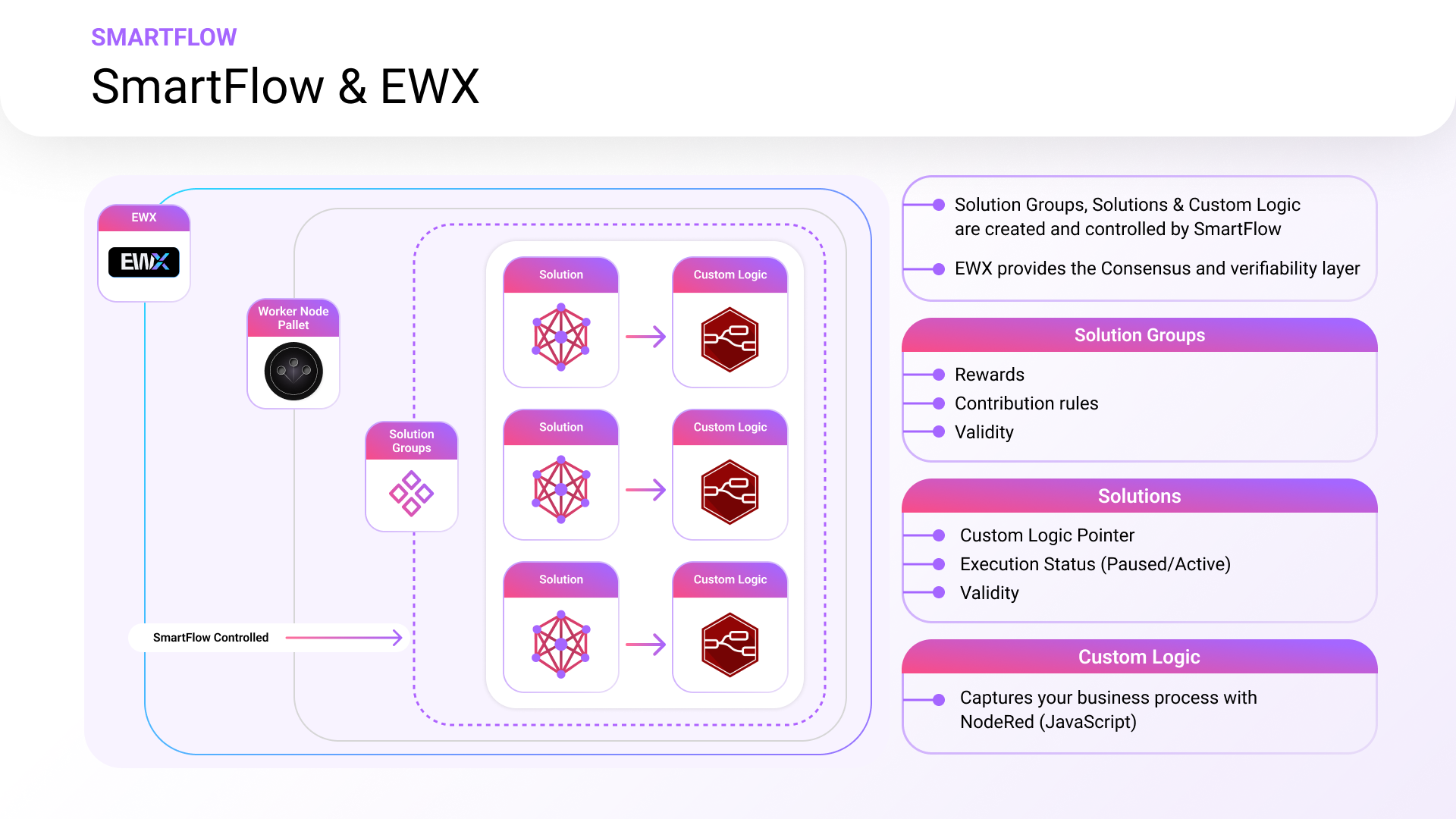
SmartFlow is based on 3 core components:
* [**Solution Groups**](#solution-group)
* [**Business Logics**](#smartflows)
* [**Solutions**](#smartflows)
#### **Solution Group**
A Solution Group defines the lifecycle & governance parameters for the pool of solutions assigned to them.
Once they are published, Solution groups are added to the EW Marketplace app, allowing the subscription of Worker Nodes that will run the solution contained in the group.
#### **Business Logics**
The Business logic is the file capturing the executable work logic that is stored in IPFS.
#### Solutions
Solutions are the EWX wrapper for the Business logic that define the lifecycle & governance parameters for that logic.
## How does SmartFlow work?
SmartFlow allows users to:
* Create Business logics in a no-code NodeRed editor with the help of predefined templates
* Deploy Solutions on EWX that encapsulates the business logic
* Publish Solution Groups to EWX
* Add Solutions to public or owned Solutions Groups
Once the Solutions are live in a Solution group, [Worker Nodes](https://docs.energyweb.org/core-concepts/worker-nodes-and-worker-node-networks) take over on EWX:
* The Worker Node Operators select a Solution Group to stake EWTs in.
* The Worker Nodes execute all active solutions within the chosen Solution Group by downloading and implementing the business logic.
---
# Agent Instructions
This documentation is published with GitBook. GitBook is the documentation platform designed so that both humans and AI agents can read, navigate, and reason over technical content effectively. Learn more at gitbook.com.
## Querying This Documentation
If you need additional information that is not directly available in this page, you can query the documentation by asking a question.
Perform an HTTP GET request on the following URL with the `ask` and `goal` query parameters:
```
GET https://docs.energyweb.org/launchpad/ewx-ecosystem-offerings/smartflow.md?ask=&goal=
```
`ask` is the immediate question: it should be specific, self-contained, and written in natural language.
`goal` is what the user is ultimately trying to achieve, the reason they need the answer. Sharing it helps GitBook give you a better, more relevant answer. A goal is most helpful when it describes the outcome the user wants rather than restating the question. For example, with `ask=how do I create an API token`, a goal like `automate deployments from our CI pipeline` lets GitBook tailor the answer to that use case.
The response will contain a direct answer to the question and relevant excerpts and sources from the documentation.
Use this mechanism when the answer is not explicitly present in the current page, you need clarification or additional context, or you want to retrieve related documentation sections.