> For the complete documentation index, see [llms.txt](https://docs.energyweb.org/llms.txt). Markdown versions of documentation pages are available by appending `.md` to page URLs; this page is available as [Markdown](https://docs.energyweb.org/launchpad/subscriptions-and-payments/ewt-payments.md).
# EWT Payments
You can purchase Launchpad subscriptions with Energy Web Tokens (EWT) based on [EWX](https://docs.energyweb.org/ewx-ecosystem/energy-web-x).
[**Learn more about Energy Web Tokens on EWX**](https://docs.energyweb.org/ewc-ecosystem/energy-web-tokens#ewt-on-energy-web-x)
All created accounts on Launchpad automatically receive an EWX address, allowing you to deposit EWT and use them to pay for your subscriptions.
* [EWT](#ewt-balance-and-information)[ Balance and information](#ewt-balance-and-information)
* [Topping up your EWT](#toping-up-your-ewt)
* [Withdrawing EWT from your account](#withdrawing-your-ewt)
* [Paying with EWT](#paying-using-ewt)
## EWT Balance and Information
You can view and manage your or your organization's EWT balance in Settings > "[My Profile](https://launchpad.energyweb.org/app/settings)":
**IMPORTANT:** Only organization owners can access the "Manage" menu. If you are a 1-person account, you will always be able to access it.
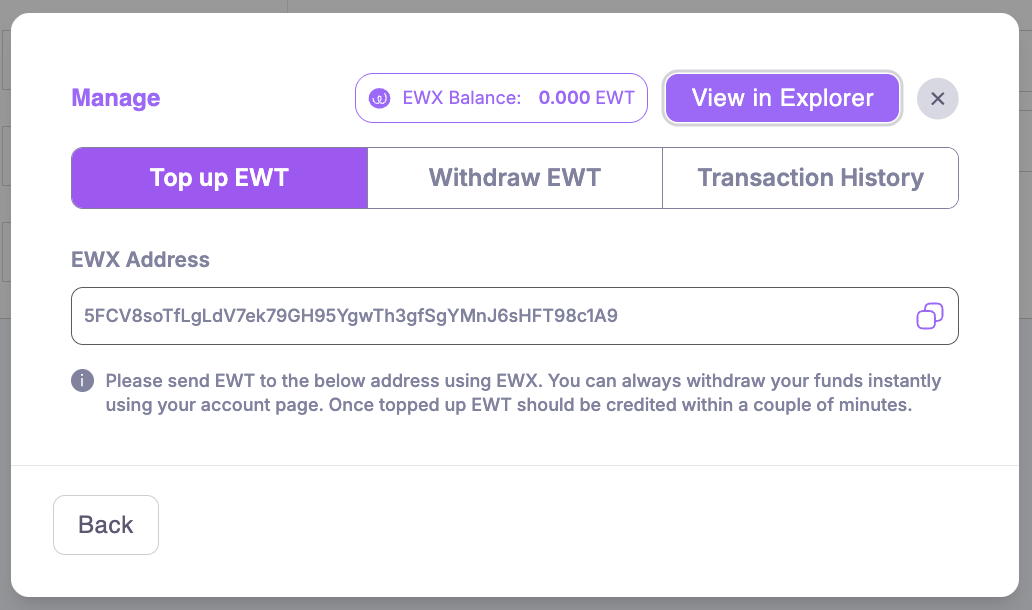
The "Manage" menu allows you to view, top up and withdraw your EWT. It also lets you access your EWX address on the Explorer and your transaction history on Launchpad.
## Toping up your EWT
To top up your account, copy the address entered in the "Manage" menu and send the desired amount of tokens via your wallet.
{% hint style="danger" %}
**Please note that your address used for payment is an EWX address**. If you have tokens in an EWC based wallet, you will need to lift them before you can deposit them in the EWX address. [Learn how to lift your tokens](https://docs.energyweb.org/ewx-ecosystem/worker-nodes/the-marketplace-app/token-management/lifting-tokens). **This is crucial, transferring tokens directly from EWC to EWX will result in their loss.**
{% endhint %}
The EWT Balance will refresh every minute, allowing you to quickly view your new balance.
You can top-up via the "Manage" menu in your profile, or directly at purchase.
## Withdrawing your EWT
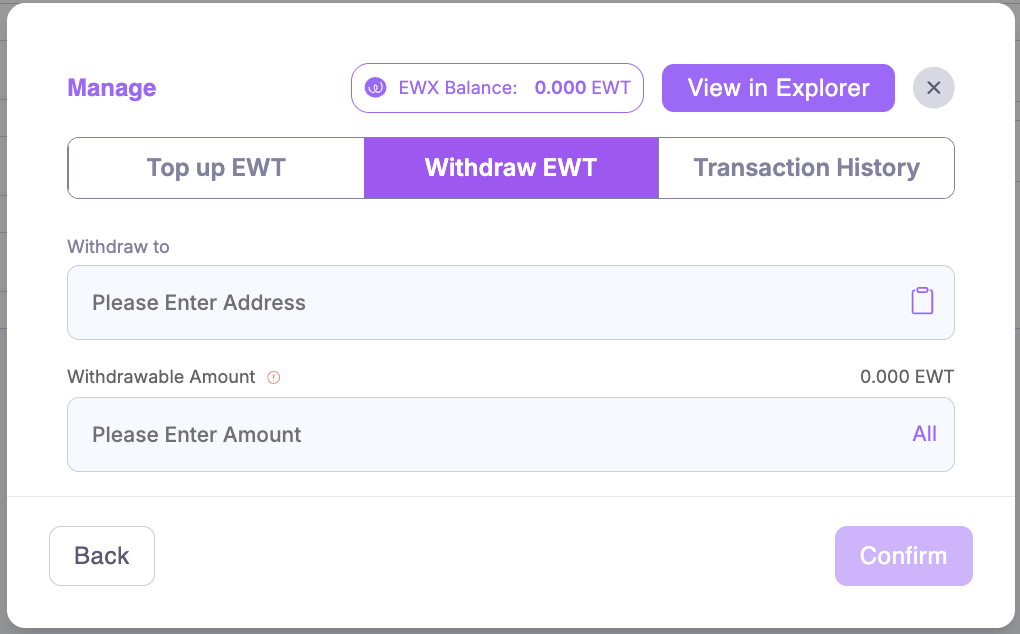
You can withdraw EWT from your account using the "Withdraw" tab of the "Manage" menu under My Profile.
You need to enter the address that will receive the funds under "Withdraw to" as well as the amount you want to withdraw.
**Be sure that you are entering the right address, your funds cannot be recovered if you made a mistake.**
Once you click "Confirm", a new screen will appear asking you to enter the One-Time Password received via email. The OTP will be sent to your account email.
Once you have verified your withdrawal, you will quickly see your Balance updated and receive the funds on the requested address.
*Reminder: only organization owners or 1-user account owners can withdraw EWT.*
## Paying using EWT
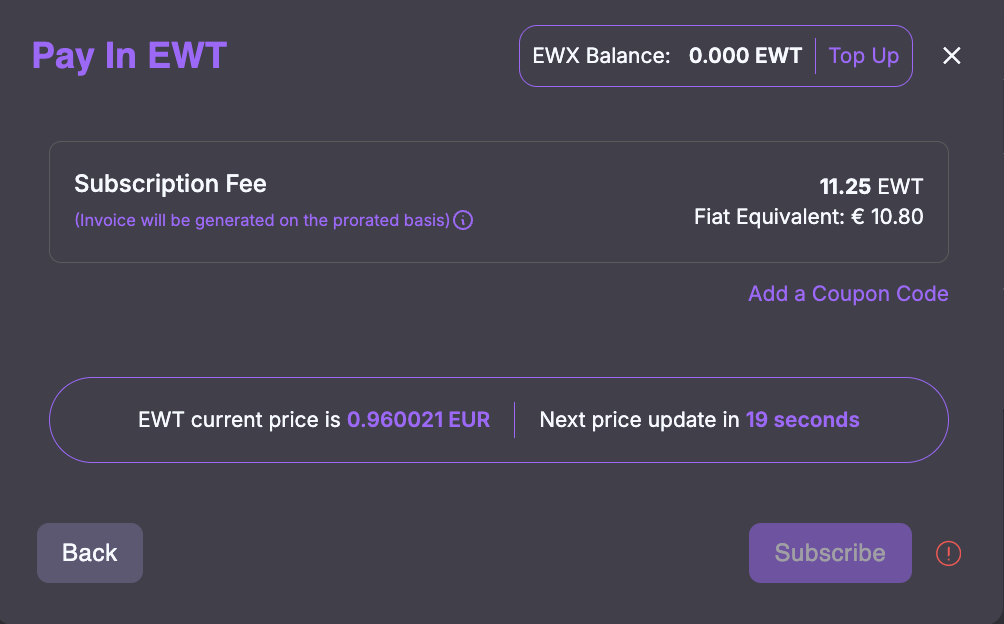
To pay using EWT instead of Fiat, make sure to tick the "Pay in EWT" tick box before clicking "Subscribe".
You will see a screen showing you your EWT Balance (which you can still top up at this point), the amount of tokens you will pay and the fiat equivalent, as well as the current EWT price. The current EWT price is auto-updated every 30 seconds.
Your payment will be processed as soon as you click the "Subscribe" button. You will receive an invoice in your account email and your EWT Balance will be updated. The invoice will show the amount in FIAT and VAT information when applicable.
---
# Agent Instructions
This documentation is published with GitBook. GitBook is the documentation platform designed so that both humans and AI agents can read, navigate, and reason over technical content effectively. Learn more at gitbook.com.
## Querying This Documentation
If you need additional information that is not directly available in this page, you can query the documentation dynamically by asking a question.
Perform an HTTP GET request on the current page URL with the `ask` query parameter, and the optional `goal` query parameter:
```
GET https://docs.energyweb.org/launchpad/subscriptions-and-payments/ewt-payments.md?ask=&goal=
```
`ask` is the immediate question: it should be specific, self-contained, and written in natural language.
`goal` is optional and describes the broader end goal you are ultimately trying to accomplish on behalf of the user. GitBook uses it to tailor the answer towards what is most useful for that goal.
The response will contain a direct answer to the question and relevant excerpts and sources from the documentation.
Use this mechanism when the answer is not explicitly present in the current page, you need clarification or additional context, or you want to retrieve related documentation sections.