> For the complete documentation index, see [llms.txt](https://docs.energyweb.org/llms.txt). Markdown versions of documentation pages are available by appending `.md` to page URLs; this page is available as [Markdown](https://docs.energyweb.org/ewx-ecosystem/worker-nodes/server-based-worker-nodes.md).
# Server-based Worker Nodes
#### What is a Worker Node?
A Worker Node is a lightweight off-chain processing unit with an ability to execute business logic in a form of NodeRed flow file.
A Worker Node executing logic can actively contribute in meaningful way to range of use cases. Examples can be found here: [Worker Node Usage Use Cases](https://docs.energyweb.org/ewx-ecosystem/worker-nodes/sample-enterprise-use-cases).
Worker Nodes functionalities and **EWX** blockchain connection enable transparency and verification capabilities for your system. Additionally, thanks to its lightweight architecture, worker nodes are perfectly suitable and a good fit for applications that require decentralized execution components.
***
#### How can it be used?
Worker Node, apart from its initial set-up, is entirely controlled by **Blockchain based actions**. That means that after your initial Worker set-up is completed, no additional changes will be needed.
Blockchain based action controlling Worker Node behavior could be applied via the Marketplace App - an EW built Blockchain Operator UI, or by directly interacting with blockchain.
To understand more about how Worker Nodes can be used, please go to the [Sample Use Cases](https://docs.energyweb.org/ewx-ecosystem/worker-nodes/worker-node-use-cases/sample-enterprise-use-cases.md) section.
***
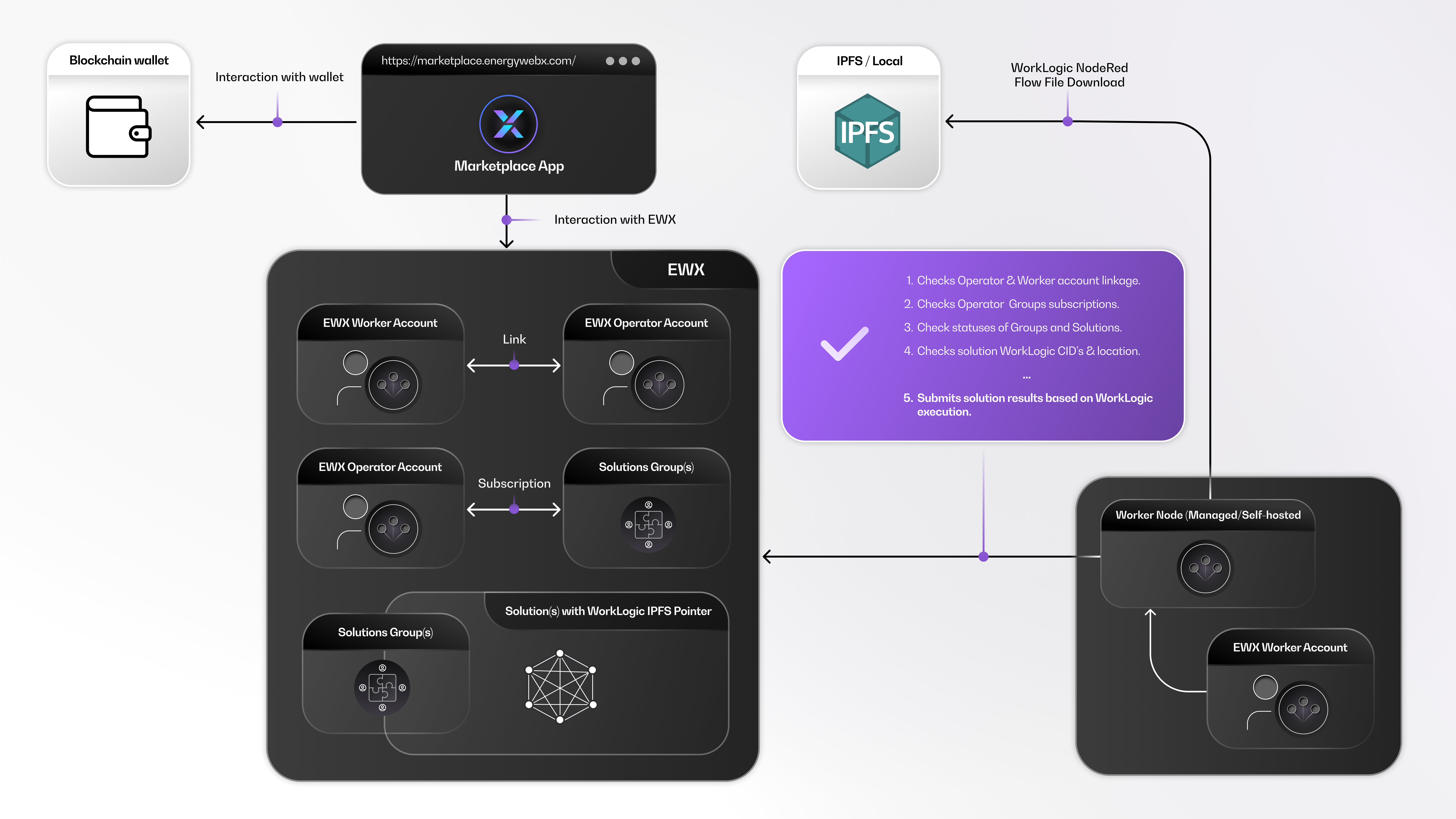
#### High level architecture within EWX ecosystem
Below you can find a High Level Architecture to understand how worker node fit into the wider EWX ecosystem.
***
#### Server Based Worker Node uniqueness
Server based Worker Node main differentiation is visible when you compare it to the Marketplace Desktop App.
The Marketplace Desktop App contains both Worker Node running engine as well as Blockchain Interaction UI.
For Server based Worker Nodes, the Blockchain Interaction UI was de-coupled from Worker Engine to achieve the best from both sides.
***
#### When you would like to use Server Based Worker Node?
1. You want to have a reliable PROD-level set-up for your Worker Node
2. You don't want/can't use desktop application for blockchain set-up management/worker engine (e.g. because you don't want to keep your desktop running 24/7)
3. You anticipate heavier loads to be run on top of your Worker Node
---
# Agent Instructions
This documentation is published with GitBook. GitBook is the documentation platform designed so that both humans and AI agents can read, navigate, and reason over technical content effectively. Learn more at gitbook.com.
## Querying This Documentation
If you need additional information that is not directly available in this page, you can query the documentation by asking a question.
Perform an HTTP GET request on the following URL with the `ask` and `goal` query parameters:
```
GET https://docs.energyweb.org/ewx-ecosystem/worker-nodes/server-based-worker-nodes.md?ask=&goal=
```
`ask` is the immediate question: it should be specific, self-contained, and written in natural language.
`goal` is what the user is ultimately trying to achieve, the reason they need the answer. Sharing it helps GitBook give you a better, more relevant answer. A goal is most helpful when it describes the outcome the user wants rather than restating the question. For example, with `ask=how do I create an API token`, a goal like `automate deployments from our CI pipeline` lets GitBook tailor the answer to that use case.
The response will contain a direct answer to the question and relevant excerpts and sources from the documentation.
Use this mechanism when the answer is not explicitly present in the current page, you need clarification or additional context, or you want to retrieve related documentation sections.